结合 Laravel 的 Schema 构建器构建应用的数据库表结构,类似于数据库的版本控制,允许团队成员间编辑并共享应用的数据库表结构
Laravel 的 Schema 门面提供了与数据库系统无关的创建和操纵表的支持,在 Laravel 所支持的所有数据库系统中提供一致的、优雅的、流式的 API,将 SQL 转成 PHP 去执行
部署环境(WAMP)
php 7.3.1
composer 1.8.4
laravel 5.8.0
MySQL 5.7.24
迁移步骤
- MySQL 数据库创建 Database
- 到 laravel 目录下修改
.env文件符合数据库配置
1
2
3
4
5
6
| DB_CONNECTION=mysql
DB_HOST=127.0.0.1
DB_PORT=3306
DB_DATABASE=your_database_name
DB_USERNAME=root
DB_PASSWORD=
|
到 laravel 目录创建新的迁移
php artisan make:migration create_table_name
创建的数据表在laravel\database\migration目录下
--table和--create选项可以用于指定表名以及该迁移是否要创建一个新的数据表。这些选项只需要简单放在上述迁移命令后面并指定表名
php artisan make:migration create_users_table --create=users
php artisan make:migration add_votes_to_users_table --table=users
编写迁移数据表
迁移类包含了两个方法:up和down。up方法用于新增表,列或者索引到数据库,而down方法就是up方法的反操作
用到 Laravel 的schema构建器来创建和修改表,后面给出具体实现方法
运行迁移表到数据库
php artisan migrate
强制运行这些命令而不被提示,可以使用—force(不推荐)
php artisan migrate --force
在 MySQL 中可以看到 Database 下有新的表
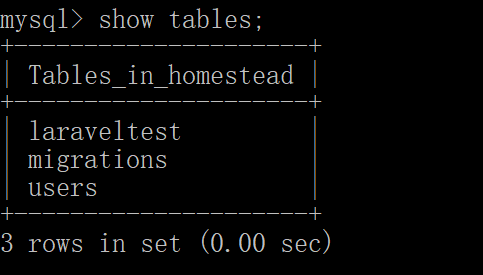
在 Database 下有 migration 表,使得 laravel 可以回滚
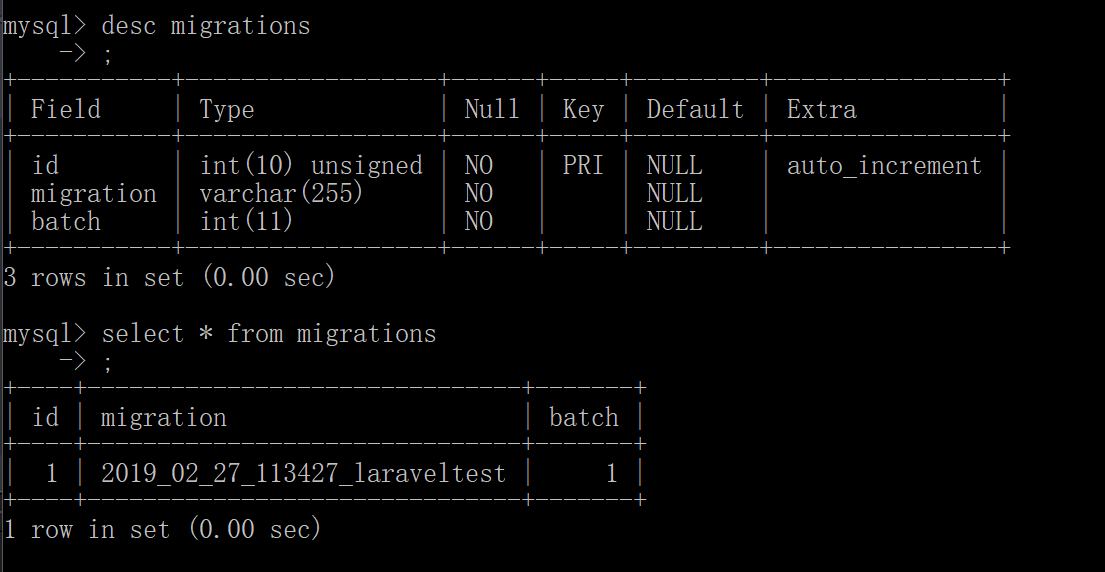
执行文件中的public function down(),回滚最后一批运行的迁移
php artisan migrate:rollback
回滚所有的应用迁移
php artisan migrate:reset
先回滚所有数据库迁移
php artisan migrate:refresh
回滚或重建指定数量的迁移,refresh 命令提供的 step 选项
php artisan migrate:refresh --step=5
在迁移之前进行试验
php artisan migrate --pretend
创建表
使用 Schema 门面上的 create 方法来创建新的数据表。create 方法接收两个参数,第一个是表名,第二个是获取用于定义新表的 Blueprint 对象的闭包
Schema::create('table_name', function (Blueprint $table){ })
创建表中的列
在 Schema 中创建表中的列结构 $table->类型('名称');
1
2
3
4
5
6
7
8
9
10
11
12
13
14
15
16
17
18
19
20
21
22
23
24
25
26
27
28
29
30
31
32
33
34
35
36
37
38
39
40
41
42
43
44
| $table->bigIncrements('id');
$table->bigInteger('votes');
$table->binary('data');
$table->boolean('confirmed');
$table->char('name', 4);
$table->date('created_at');
$table->dateTime('created_at');
$table->dateTimeTz('created_at');
$table->decimal('amount', 5, 2);
$table->double('column', 15, 8);
$table->enum('choices', ['foo', 'bar']); //等同于数据库中的 ENUM类型
$table->float('amount'); //等同于数据库中的 FLOAT 类型
$table->increments('id'); //数据库主键自增ID
$table->integer('votes'); //等同于数据库中的 INTEGER 类型
$table->ipAddress('visitor'); //等同于数据库中的 IP 地址
$table->json('options'); //等同于数据库中的 JSON 类型
$table->jsonb('options'); //等同于数据库中的 JSONB 类型
$table->longText('description'); //等同于数据库中的 LONGTEXT 类型
$table->macAddress('device'); //等同于数据库中的 MAC 地址
$table->mediumIncrements('id'); //自增ID,类型为无符号的mediumint
$table->mediumInteger('numbers'); //等同于数据库中的 MEDIUMINT类型
$table->mediumText('description'); //等同于数据库中的 MEDIUMTEXT类型
$table->morphs('taggable'); //添加一个 INTEGER类型的 taggable_id 列和一个 STRING类型的 taggable_type列
$table->nullableTimestamps(); //和 timestamps()一样但允许 NULL值.
$table->rememberToken(); //添加一个 remember_token 列: VARCHAR(100) NULL.
$table->smallIncrements('id'); //自增ID,类型为无符号的smallint
$table->smallInteger('votes'); //等同于数据库中的 SMALLINT 类型
$table->softDeletes(); //新增一个 deleted_at 列 用于软删除.
$table->string('email'); //等同于数据库中的 VARCHAR 列 .
$table->string('name', 100); //等同于数据库中的 VARCHAR,带一个长度
$table->text('description'); //等同于数据库中的 TEXT 类型
$table->time('sunrise'); //等同于数据库中的 TIME类型
$table->timeTz('sunrise'); //等同于数据库中的 TIME 类型(带时区)
$table->tinyInteger('numbers'); //等同于数据库中的 TINYINT 类型
$table->timestamp('added_on'); //等同于数据库中的 TIMESTAMP 类型
$table->timestampTz('added_on'); //等同于数据库中的 TIMESTAMP 类型(带时区)
$table->timestamps(); //添加 created_at 和 updated_at列
$table->timestampsTz(); //添加 created_at 和 updated_at列(带时区)
$table->unsignedBigInteger('votes'); //等同于数据库中无符号的 BIGINT 类型
$table->unsignedInteger('votes'); //等同于数据库中无符号的 INT 类型
$table->unsignedMediumInteger('votes'); //等同于数据库中无符号的 MEDIUMINT 类型
$table->unsignedSmallInteger('votes'); //等同于数据库中无符号的 SMALLINT 类型
$table->unsignedTinyInteger('votes'); //等同于数据库中无符号的 TINYINT 类型
$table->uuid('id'); //等同于数据库的UUID
|
1
2
3
4
5
6
7
8
| ->after('column')
->comment('my comment')
->default($value)
->first()
->nullable()
->storedAs($expression)
->unsigned()
->virtualAs($expression)
|
1
2
3
4
5
6
7
8
9
10
11
12
13
14
15
16
17
18
19
20
21
22
23
24
25
26
27
28
29
| class CreateTableName extends Migration
{
public function up()
{
Schema::create('table_name', function (Blueprint $table) {
$table->bigIncrements('id');
$table->string('name');
$table->string('email')->unique();
$table->timestamp('email_verified_at')->nullable();
$table->string('password');
$table->rememberToken();
$table->timestamps();
});
}
public function down()
{
Schema::dropIfExists('table_name');
}
|
修改、重命名、删除列
->change()方法允许你修改已存在的列为新的类型,或者修改列的属性
->renameColumn()方法可以重命名一个列
->dropColumn方法可以删除列
1
2
3
4
5
6
| Schema::table('users', function ($table) {
$table->string('name', 50)->change();
$table->renameColumn('from', 'to');
$table->dropColumn('votes');
$table->dropColumn(['votes', 'avatar', 'location']);
});
|
- 需要添加 doctrine/dbal 依赖到 composer.json 文件
- 暂不支持 enum 类型的列的修改和重命名
添加索引键
1
2
3
4
5
| $table->primary('id');
$table->primary(['first', 'last']);
$table->unique('email');
$table->unique('state', 'my_index_name');
$table->index('state');
|
删除索引
1
2
3
| $table->dropPrimary(' ');
$table->dropUnique(' ');
$table->dropIndex(' ');
|
外键约束(loading…)
检查列表是否存在
使用 hasTable 和 hasColumn 方法检查表或列是否存在
1
2
3
4
5
6
7
| if (Schema::hasTable('users')) {
}
if (Schema::hasColumn('users', 'email')) {
}
|
设置表的存储引擎,在 schema 构建器上设置 engine 属性
1
2
3
4
| Schema::create('users', function ($table) {
$table->engine = 'InnoDB';
$table->increments('id');
});
|
重命名/删除表
在public function up()中添加
Schema::rename('your_table_name','change_name');
更新public function down()中的表名
在public function down()中添加
Schema::drop('users'); 或 Schema::dropIfExists('users');
用于迁移的回滚
参考:
Laravel 数据库迁移
Database Migration